Planet Clicker · Idle growth
Planet Clicker
Click Earth. Put your upgrades to work.
Bored at your computer? Play Planet Clicker: tap Earth, buy automatic producers, and watch your income climb. Make your first Campfire a quick goal, then work toward Mars and Venus when you have more time.
Similar Games
More picks like Planet Clicker

How to play
Start with the essentials
- Step 1. Start Planet Clicker on Earth. Click or tap the planet until you have 20 energy, then open SHOP and buy Earth Clicker to double each click’s reward.
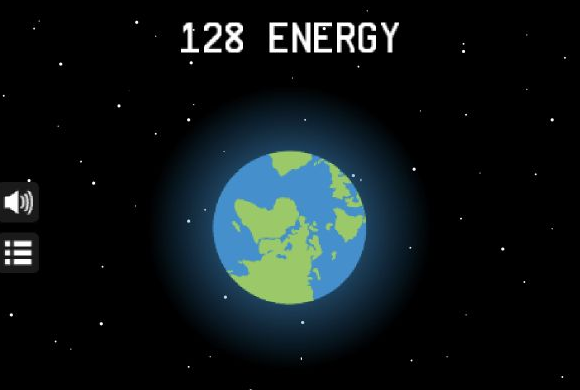
- Step 2. Return to Earth and build up 100 energy for your first Campfire. After buying it, stop clicking briefly: the total should keep rising and show 1 PER SECOND.
- Step 3. Reopen the shop as your balance grows. Try a Farm for a bigger automatic boost, and compare the next purchase price with the extra production it adds.
- Step 4. Use the bottom arrows to check Mars. Planet Clicker asks for 1 million energy to unlock it; build up your income, buy access, and work toward Venus next.
Controls
Take control of Planet Clicker
Click or tap the planet in Planet Clicker to earn energy. Open SHOP to buy upgrades, close it with X, and use the arrows beside the planet name to switch worlds. Use the speaker button to mute sound.
Use the player toolbar to restart or enter fullscreen. If a game does not respond, click or tap inside the player first.
Mission briefing
Planet Clicker: what to buy and when to move on
Your first goal in Planet Clicker is to make every click count. Tap Earth, spend your first 20 on Earth Clicker, and check the floating reward when you return: each click now adds two. Buying an upgrade lowers your balance, so judge your progress by how quickly it fills again.
Once you can afford a Campfire, Planet Clicker starts doing some of the work for you. Watch the PER SECOND line beneath your total. A higher rate means less waiting for the next purchase. Keep clicking when you want to reach a nearby price sooner, then let your producers carry more of the run.
Planet Clicker suits you if choosing upgrades and seeing steady growth feels rewarding. The opening needs repeated taps; later progress asks for patience and spending decisions. If you want fast movement, aiming, or short levels with a clear finish, this slower loop may feel repetitive.
Have a quiet break at your computer? Give Planet Clicker one small target: buy your first Campfire, reach a Farm, or improve your PER SECOND rate before your break ends. Unlocking Mars is a longer goal, so start with a purchase you can reach soon. Choose your stopping point before you begin.
During teacher-approved classroom free time, try Planet Clicker with the sound muted and turn your next purchase into a prediction. Read the price, estimate how long your current producers need to earn it, and check the result. A little comparison gives you something to think about between clicks; return to the lesson when free time ends.
What should I buy first in Planet Clicker?
Start with the 20-cost Earth Clicker, then aim for a Campfire at 100. The first boosts your taps; the second adds 1 per second without tapping. A first Farm costs 800 and adds 10 per second.
Why is my next upgrade more expensive?
Planet Clicker raises an item’s price after you buy it. Check the current price before buying again. Compare cost divided by added production to see which automatic upgrade pays back sooner.
When should I leave Earth in Planet Clicker?
Check Mars with the bottom arrow and aim for its 1 million unlock cost. Once you can buy access, explore its shop for stronger producers. Venus gives you another target after Mars.
Do I have to keep clicking in Planet Clicker?
Only taps earn anything at the start. After your first producer, you can pause your hand while the game runs. Keep Planet Clicker open for your session, and avoid refreshing or restarting if you want to keep the current run.
Gameplay gallery
Planet Clicker gameplay
Game information
Before your next round
- Platform
- Web browser · mouse or touch
- Game view
- Landscape
- Categories
- Space Exploration Games
Games are loaded from an external provider and may display third-party ads. If something is not working, report a problem with Planet Clicker.
Beyond the game
Keep your curiosity in orbit.
Take a closer look at real worlds, then return for another mission.
A field guide to our eight neighboring worlds.
✦ToolsCompare two worldsSee how size, distance, and years measure up.
✦Quick answers
Planet Clicker questions and answers
A few things worth knowing before you start another round of Planet Clicker.
01How do you play Planet Clicker?
Start Planet Clicker by clicking or tapping Earth to collect energy. Open SHOP to spend it on stronger clicks and automatic producers. Watch your balance and PER SECOND rate, then use the bottom arrows to check the next planet and its unlock price.
02What is the best first upgrade in Planet Clicker?
Buy Earth Clicker first in Planet Clicker: its initial price is 20 energy and it doubles your click reward from 1 to 2. Next, buy your first Campfire for 100 to gain 1 energy per second. A first Farm costs 800 and adds 10 per second. Repeat purchases cost more.
03How do you get energy faster in Planet Clicker?
Increase your PER SECOND rate in Planet Clicker by buying automatic producers, and keep clicking to reach nearby purchase prices sooner. Compare each producer’s current cost with the extra output it adds. For example, a first Farm adds ten times the output of a first Campfire for eight times the price.
04How much does Mars cost in Planet Clicker?
Mars costs 1 million energy in Planet Clicker. Use the arrow beside EARTH to view Mars, build your balance to the displayed price, and select BUY. Unlocking Mars gives you another shop to explore; having enough energy alone does not purchase the planet.
05Which planets can you unlock in Planet Clicker?
Planet Clicker starts on Earth, then lets you unlock Mars and Venus. Each world offers its own upgrades. Use the arrows beside the planet name to browse worlds, check a locked planet’s price, or return to an unlocked planet’s shop.
06Does Planet Clicker keep earning energy without clicking?
Yes. Planet Clicker earns energy without clicking after you buy an automatic producer such as a Campfire or Farm. Your PER SECOND rate shows this income. Leave the game running and stop tapping briefly to check that your balance rises. Do not rely on earnings after closing the tab.
07Does Planet Clicker save progress if I refresh or close the tab?
Treat Planet Clicker as a single-session game: keep the tab open if you want to continue the current run. Refreshing the page, closing it, or using the player’s Restart button can lose your progress. Leave the game running when you only want to pause clicking.
08Is Planet Clicker free, and can I play on a phone?
Planet Clicker is free to play in the browser on this page, with no account or download needed. Use a mouse on desktop or tap the planet and shop buttons on a phone. Landscape view or the player’s Fullscreen button gives you more room to read prices and select upgrades.
09Is Planet Clicker worth playing if I prefer relaxing games?
Planet Clicker is a good fit if you enjoy choosing upgrades, watching numbers grow, and working toward the next unlock. Expect repeated taps at the start and more waiting as automatic production takes over. Players who prefer aiming, fast movement, or short levels may find Planet Clicker repetitive.
10What makes Planet Clicker one of the games to play in class when bored?
Planet Clicker can suit teacher-approved free time because you can mute it, use simple mouse or touch controls, and choose a small upgrade goal. Try earning your first Campfire, stop clicking to check how automatic income works, and make your next affordable upgrade the finish line for your break.
11Can Planet Clicker give me things to do when bored in class?
During approved free time, use Planet Clicker for a short prediction challenge: choose an upgrade, read its price, and estimate the wait from your balance and PER SECOND rate. Compare the estimate with what happens while you leave clicking alone. Try another purchase and see whether your next prediction gets closer.
12Is Planet Clicker a good choice for games to play when bored on a computer?
Planet Clicker is a good choice for a quiet computer break if you enjoy simple controls and steady growth. Start with Earth, buy a click multiplier, then aim for one automatic producer. Use the speaker button to mute sound. For a short break, finish after your chosen upgrade instead of waiting to unlock Mars.
13Are there productive things to do when bored in Planet Clicker?
Use Planet Clicker as a light calculation challenge: divide an upgrade’s price by its added output to estimate its payback time. A first Campfire costs 100 and adds 1 per second, so it takes about 100 seconds to earn its cost; a first Farm costs 800 and adds 10 per second, so it takes about 80 seconds. Compare current prices before your next purchase.
Ready to play?
Planet Clicker is waiting at the top of the page. Start another round whenever you like.